Content Security Policy (CSP)
Microsoft began rolling out Content Security Policy (CSP) enforcement across SharePoint Online tenants from 1st March 2026. This is an incremental rollout — not all tenants are affected at the same time. Your tenant may have already been updated, or the change may not have reached you yet.
This article explains what CSP is, how it affects Sprocket, and how to resolve any issues if you are impacted.
What is Content Security Policy?
Content Security Policy is a browser security feature that controls which external scripts are permitted to execute on a web page. SharePoint now maintains a list of Trusted Script Sources at the tenant level. Any script loaded from a source not on that list will be blocked from executing.
For further reading, refer to:
- SharePoint Online CSP Enforcement Dates and Guidance — Microsoft Community Hub
- Content Security Policy (CSP) — MDN Web Docs
How CSP Affects Sprocket
Sprocket loads several code libraries from external CDN servers. This is standard and recommended practice when building multi-web part SharePoint solutions — libraries such as Lodash, jQuery, and Moment are downloaded once by the browser and cached, meaning every web part that needs the same library reuses the cached version rather than downloading it again.
However, Microsoft's CSP enforcement does not automatically add external script sources for existing installed solutions to the approved list. This means that after the enforcement date, these sources may be blocked.
Symptoms and Fixes
| Issue | Fix |
|---|---|
| Sprocket web parts not loading — "Oops, something went wrong" | Reinstall Sprocket |
| Embed web part scripts not executing | Update to Sprocket 7.0.2+ |
| Custom JS / Analytics not executing | Update to Sprocket 7.0.2+ |
| Location Finder map not rendering | Add Google Maps source |
| Custom embedded scripts not executing | Add the source URL |
You can delay CSP enforcement for your tenant by up to 90 days using a PowerShell script, giving you time to work through the fixes above. Enforcement resumes on 1st June 2026 and cannot be deferred further. See the PowerShell script below.
Reinstalling Sprocket
When a SharePoint app is installed or reinstalled, SharePoint reads the app package and automatically adds its external script sources to the Trusted Script Sources list. Reinstalling Sprocket triggers this process and resolves "Something went wrong" errors caused by blocked CDN sources.
- Go to your tenant App Catalog
- Download the currently installed Sprocket package
- Delete the Sprocket package from the App Catalog
- Reinstall the downloaded package
During reinstallation, SharePoint will display a trust confirmation dialog listing the external domains Sprocket requires. These are the sources that will be registered in your Trusted Script Sources list.
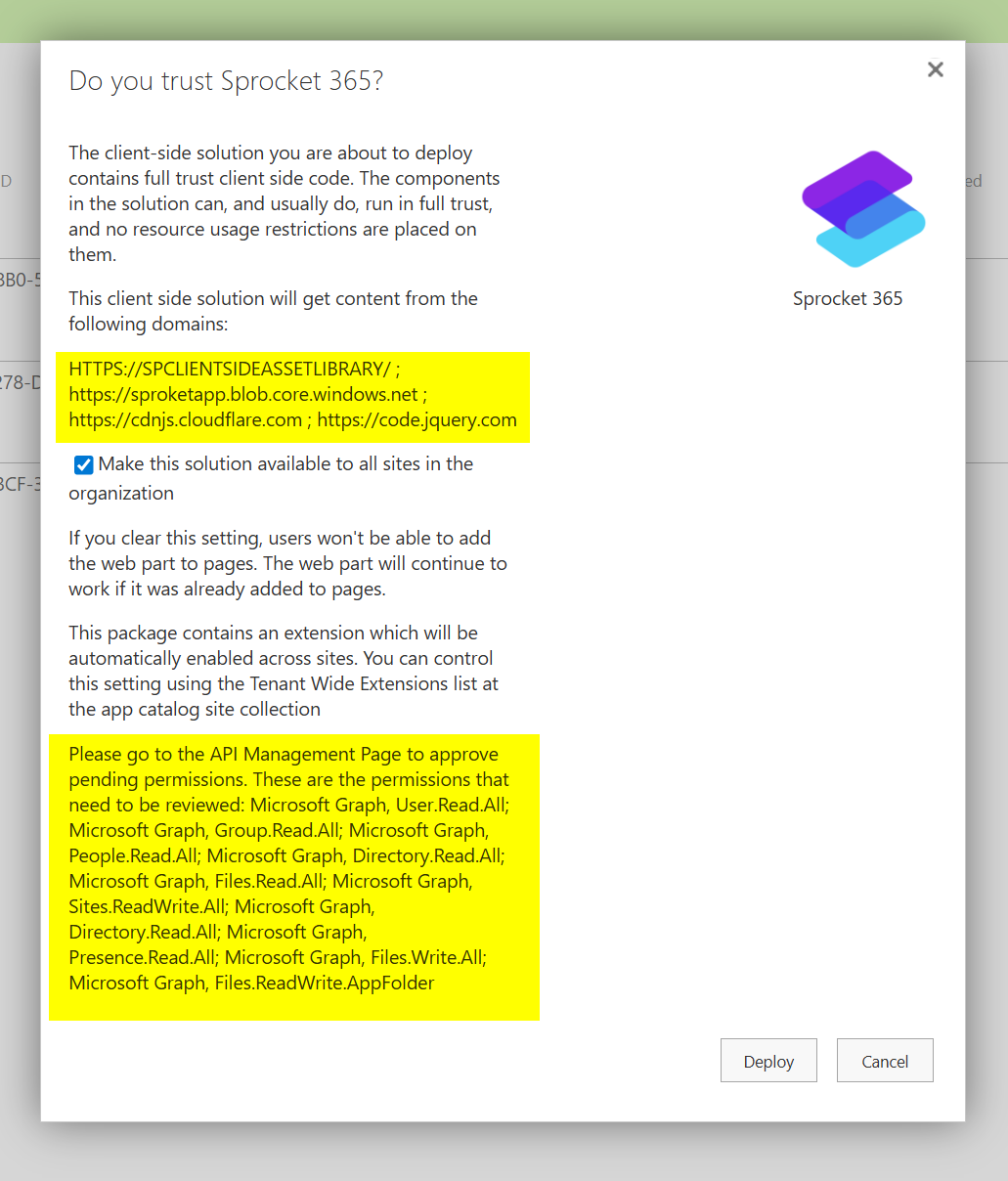
Refer to the upgrading Sprocket guide for step-by-step instructions.
Reinstalling fixes blocked external CDN sources only. It does not fix issues with the Embed web part or Custom JS / Analytics, which use inline scripts. These require a Sprocket version update to 7.0.2 or later.
Updating to 7.0.2
Sprocket 7.0.2 changes how inline scripts are executed internally to comply with CSP. This resolves issues with:
- Embed web part — embedded scripts were being blocked under the new CSP rules
- Custom JS & Analytics — custom JavaScript was being blocked under the new rules
To resolve these issues, upgrade Sprocket to version 7.0.2 or later.
Sources Required by Sprocket
The following external sources are used by Sprocket. These are automatically added to the Trusted Script Sources list when Sprocket is installed or reinstalled.
| Source URL | Purpose |
|---|---|
https://cdnjs.cloudflare.com/ | Core libraries (Lodash, jQuery, Moment) |
https://code.jquery.com/ | Rich text editor |
https://sproketapp.blob.core.windows.net/ | Sprocket shared library |
Location Finder
If you are not using the Location Finder web part, this section is not relevant to you.
The Location Finder web part depends on the Google Maps SDK to render maps. Because this SDK is loaded from an external Google source, the following URL must be manually added to your Trusted Script Sources list in the SharePoint Admin Centre:
https://maps.googleapis.com/
See Adding a Source below for instructions.
Embed Web Part and Custom Scripts
The Embed web part allows users to include custom HTML with external scripts. If the embedded code loads a script from an external URL, that URL's domain must be added to the Trusted Script Sources list.
For example, if the embed code contains:
<script src="https://cdn.jsdelivr.net/npm/[email protected]/dist/confetti.browser.min.js"></script>
Then https://cdn.jsdelivr.net/ must be on the approved list.
Check with the user or site owner which URLs their embed code loads scripts from, and add each domain as a trusted source.
CSP Warning Alerts
From Sprocket 7.0.2, if external script sources are being blocked by CSP, Sprocket will display an admin alert on the page indicating which sources are blocked and what needs to be added to the approved list. This makes it much easier to identify and resolve CSP issues without needing to check the browser console.

Adding a Source
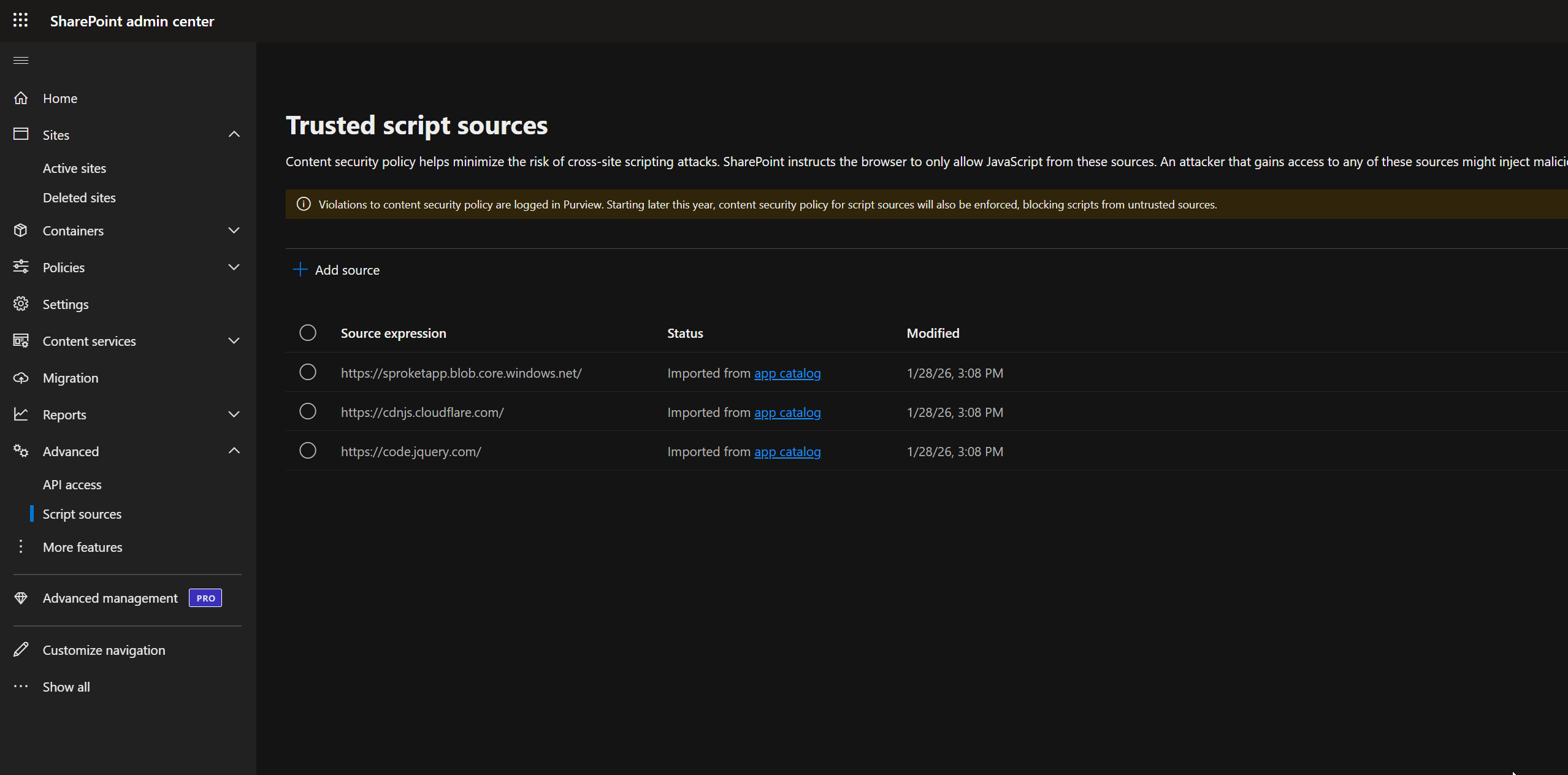
To add an external source to SharePoint's Trusted Script Sources list:
- Open the SharePoint Admin Center
- Navigate to Advanced > Script sources
- Click + Add source
- Enter the source URL
- Click Save
Changes apply across the entire tenant.
Delaying CSP Enforcement
If you need more time before CSP enforcement applies to your tenant, you can delay it by up to 90 days (until 1st June 2026) using the following PowerShell commands:
# Set SharePoint Online Admin Center URL
$AdminSiteURL = "https://[Tenant]-admin.sharepoint.com"

# Connect to SharePoint Online Admin Center
Connect-SPOService -Url $AdminSiteURL
Get-SPOTenant | Select-Object DelayContentSecurityPolicyEnforcement
Set-SPOTenant -DelayContentSecurityPolicyEnforcement $true

# IMPORTANT: Run Get-SPOTenant again to correctly persist the setting
Get-SPOTenant | Select-Object DelayContentSecurityPolicyEnforcement
The 90-day delay is a temporary measure. We strongly recommend resolving CSP issues rather than relying on the delay, as enforcement will resume on 1st June 2026 and cannot be deferred further.
Why This Matters
Before CSP, any external script could execute on SharePoint pages with no admin oversight. There was no central visibility into which external sources were running code across the tenant.
With CSP, administrators now have a central list of every approved script source in the SharePoint Admin Center. Unwanted or risky sources can be removed at the tenant level and will immediately stop executing across all sites — a significant security improvement for the platform overall.
Still Having Issues?
If you've followed the steps above and are still experiencing problems, contact our support team at [email protected] with:
- Your Sprocket version number
- A description of which web parts or features are affected
- Any error messages or browser console output